Let’s get one thing out of the way. ArcGIS Online is a great platform. It has its quirks but it has been industry standard for over a decade. This article isn’t about replacing AGOL. It’s about one specific problem. What happens when you want to share GIS data with a client or a coworker?
This is where AGOL might not be the best solution, depending on your budget, workflow, or other requirements:
- you want to share a simple link that anyone can open
- you want to embed the map on your website
- data needs to update frequently
- you don’t want to deal with AGOL viewer licensing
In this article we’re going to explore a few tools that might help. The answer is not universal and depends on what you’re trying to deliver.
Alternatives to ArcGIS Online for sharing GIS data
Felt
Felt is one of the strongest modern web GIS tools. It feels polished, it is easy to use in the browser, and it works well for collaborative map work. It can be a great choice, but it can also be more tool than you need if you’re already in the Esri ecosystem.
Felt is a good fit when:
- collaboration matters
- the team wants to work in the browser
- lightweight analysis is part of the workflow
- presentation quality matters
It might be more than you need if you only have to publish prepared data, or if the client just needs a clean link to view the result.
Google My Maps
Google My Maps is simple, familiar, and good enough for many basic maps. In many cases it is all you need.
It is not a serious GIS publishing platform, but that is also part of the appeal. For professional GIS handoff though, the limits show pretty quickly. Once you need professional styling, richer GIS formats, or something that has to look like a client deliverable, you’ll outgrow it.
uMap
uMap is an open-source tool for creating lightweight, public web maps on top of OpenStreetMap.
It is useful when you want a simple public map and prefer an open-source option. It can also be self-hosted, which matters for some teams. But when the map is part of a client delivery process, it might not be the best choice. Polished client handoff, scheduled refresh, and richer publishing features are not really its strengths.
qgis2web
qgis2web is a tried, tested and beloved QGIS plugin that exports your QGIS project to a web map. It can be a great option when you already work in QGIS and want a free way to create a static web map.
The main tradeoff is that you are exporting a static web map, which you need to host somewhere and you need to know a little bit of coding. And guess who’s getting an email when the data changes and the map needs an update. You.
It works well when the map is mostly static and you’re comfortable hosting the exported files. It works less well when the data changes often, or when non-technical people need to update the map.
Mapbox, Leaflet, and MapLibre
Mapbox, Leaflet, and MapLibre are not really ArcGIS Online alternatives in the same category. They are better thought of as developer tools for building custom maps.
That can be exactly what you need if you need a bespoke solution and you have the time and skills to implement it. If the map is part of a product, a custom website, or a more controlled user experience, a developer-built map may be the right answer.
The downside is everything that comes after launch:
- the GIS person can’t manage it alone
- every change creates developer work
- you’re maintaining hosting, data conversion, and frontend code
CARTO
CARTO is more of a location intelligence and data platform than a lightweight map sharing tool. It can be the right tool for data-heavy teams. It makes sense when spatial data is part of a larger analytics or data infrastructure workflow.
It can also be too much if the job is just sharing a finished map. If the audience only needs a clean viewer, CARTO is closer to “build a spatial data system” than “publish this map.”
Topologis
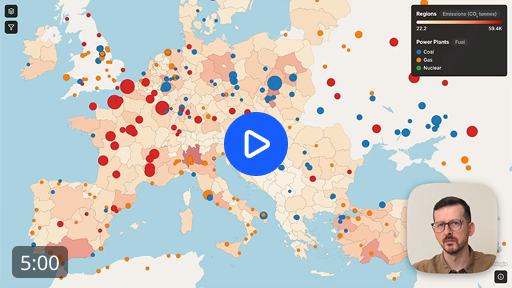
Topologis is focused on the publishing step. Taking prepared GIS data and turning it into a shareable or embeddable map. It is not trying to replace desktop GIS. It is not a full enterprise GIS stack.
It fits when:
- the data is already prepared
- viewers should not need accounts
- you need a public or private share link or an embedded map
- your workflow starts in QGIS
- you need refresh from Google Sheets or URL sources
Topologis supports common GIS files (Shapefile, GeoPackage, GeoJSON, KML, CSV), plus Google Sheets and URL imports. For data that changes, scheduled imports can refresh maps from Google Sheets or URL sources.
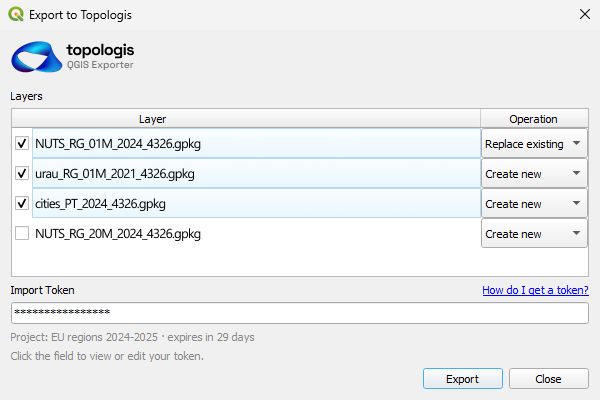
There is also a QGIS exporter plugin. From QGIS, you can push layers into a Topologis project with a few clicks. You can add new layers or overwrite existing ones, which is useful when QGIS is still where the real GIS work happens.
It is not the right tool when you need desktop GIS analysis, browser-based feature editing, geoprocessing, or a full enterprise GIS system.
Simple comparison table
| Tool | Best for | Watch out for |
|---|---|---|
| Felt | Collaborative browser-based GIS | May be more platform than you need |
| Google My Maps | Simple casual maps | Limited GIS depth and styling |
| uMap | Simple open-source web maps | Less polished for client delivery |
| qgis2web | Static exports from QGIS | Updates and hosting are on you |
| Mapbox / Leaflet / MapLibre | Custom developer-built maps | Requires code and maintenance |
| CARTO | Data teams and spatial analytics | Overkill for simple map sharing |
| Topologis | Sharing and embedding prepared GIS data | Not a full GIS analysis suite |
Why we made Topologis
A lot of GIS work is already done before publishing starts. The data might be prepared in QGIS, ArcGIS Pro, spreadsheets, scripts, databases, or some internal workflow. Then you need to get the result quickly in front of someone else.
The usual options are not always great, as we tried to argue so far in this article, and we tried to solve the following pain points:
- You can send raw files, but that only works if the recipient is comfortable with GIS data.
- You can send screenshots or PDFs, but then the map is no longer interactive.
- You can build a custom web map, but now someone has to maintain it.
- You can generate static files, but then the data changes.
- You can use a large platform, but sometimes that is more than the project needs.
One reason we built the QGIS exporter plugin is that many people already prepare their maps in QGIS. They should not have to rebuild everything from scratch just to share it. The plugin lets them push layers into a Topologis project, either as new layers or by overwriting existing ones.
The same idea applies to Google Sheets and URL sources. If the data changes, the map should not require a full manual publishing process every time.
Topologis is not the right answer for every GIS workflow. It is for the publishing layer between “the data is ready” and “someone else needs to open this map.”
Conclusion
There is no single best AGOL alternative for sharing GIS data.
Simple maps can use simple tools. Static QGIS maps can use qgis2web if you have where to host it and know code. Custom products probably need Mapbox, Leaflet, or MapLibre. Data-heavy teams may need CARTO. Browser-first teams who already use Felt might not want to switch.
If the job is to take prepared GIS data and share it as a clean link or embed, especially with QGIS handoff, Google Sheets, URL imports, or scheduled refresh, that is where Topologis fits.
The solution for sharing maps is not always the most powerful platform. Sometimes it is the tool that gets a finished map in front of the right people with the least extra work.

Nikolay Dyankov, Founder