qgis2web is useful when you want to turn a QGIS project into a static web map without writing code.
But publishing a map online is not always just exporting HTML and uploading it somewhere. Sometimes you need hosting, embeds, client handoff, easier updates, larger datasets, filters, layer controls, or a way for non-technical people to keep the map current.
This article looks at qgis2web alternatives based on what you actually need.
When qgis2web is the right choice
qgis2web is a good fit when your map is small, mostly static, and you are comfortable uploading the exported files somewhere.
It works well for one-off maps, demos, class projects, and simple public maps where you do not need a hosted publishing workflow.
If you just want a free static export from QGIS, qgis2web may be enough.
Where qgis2web starts to feel limiting
qgis2web can get awkward when the map needs to change often, or when the client expects a clean link instead of a folder of exported files.
It can also be the wrong fit when you want to embed the map on a website without managing code, when the dataset is too large for a simple browser export, or when non-technical people need to update the data later.
That is usually where people start looking for alternatives, so let’s explore some in this article.
1. Topologis
Best for: publishing prepared GIS data as hosted, shareable, embeddable maps.
Topologis is not trying to replace QGIS. You still prepare your data in QGIS, then publish it online through Topologis.
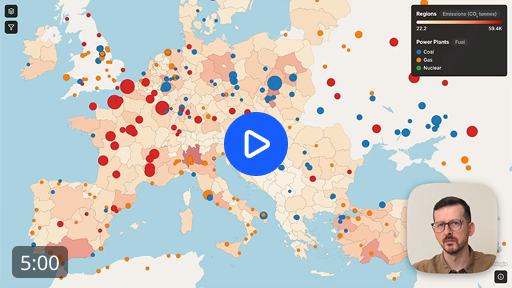
It is a good fit when you need a public share link, an embedded map, layer toggles, viewer filters, tooltips, or a way to update the map later without rebuilding a static export.
Topologis also supports scheduled updates from URL sources and Google Sheets, so the map can stay current when the source data changes.
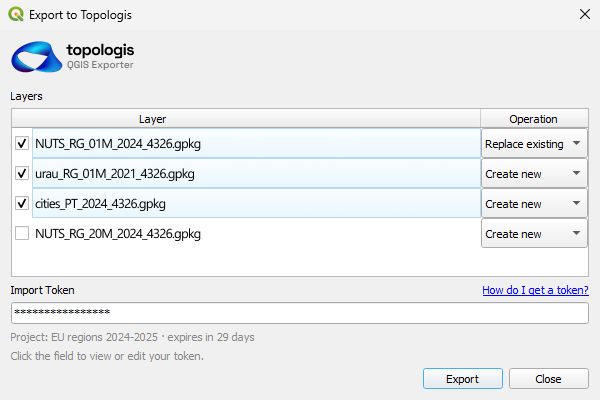
There is also a QGIS plugin, so you can export from QGIS directly into a Topologis project instead of manually moving files around every time.
2. Felt
Best for: browser-based map editing and collaborative mapping.
Felt is a strong option if you want to work on maps directly in the browser and collaborate with others.
It is more of a cloud mapping workspace than a simple qgis2web replacement. That may be exactly what you need if you want browser-based editing.
It may be less ideal if your main goal is lightweight publishing, simple embedding, or keeping a QGIS-first workflow.
3. uMap
Best for: simple public maps based on OpenStreetMap.
uMap is good when you need something simple, free, and open-source.
It works well for basic markers, polygons, and public maps. It is not a full GIS publishing workflow, but that is also part of the appeal. For simple maps, it avoids a lot of complexity.
If your map needs heavier styling, larger datasets, client handoff, or structured updates, you may outgrow it.
4. Mapbox / MapLibre / Leaflet
Best for: custom web maps when you have development help.
This is the most flexible route, but also the most hands-on.
It is a good fit when you want full control over the interface, the map is part of a larger product, and you have someone available to build and maintain it.
It is less good when the client expects a simple publishing tool. You are not just choosing a map library. You are choosing to own the hosting, updates, deployment, bugs, and future changes too.
5. Google My Maps
Best for: quick casual maps.
Google My Maps is easy and familiar. It works fine for simple maps, especially for people who are not GIS users.
The tradeoff is that styling, data handling, and professional publishing options are limited.
It is a decent choice for quick internal or casual maps. It is usually not the best fit for polished client-facing GIS work.
6. CARTO
Best for: teams doing cloud geospatial analysis and data apps.
CARTO is powerful, especially around cloud data and analytics.
If your work involves spatial analysis, cloud warehouses, and larger data workflows, it may be worth considering.
If you only need to publish a prepared QGIS map online, it is probably more tool than you need.
What about ArcGIS Online?
ArcGIS Online is an obvious publishing platform, but it is not really a direct qgis2web alternative for most QGIS users.
If your team already uses Esri, AGOL may be the natural choice. But if you are looking for qgis2web alternatives because you want something lighter, cheaper, or outside the Esri ecosystem, AGOL is probably not the main comparison.
That is why I am mentioning it here, but not treating it as one of the main alternatives.
Comparison table
| Tool | Best for | Watch out for |
|---|---|---|
| qgis2web | Static QGIS web map exports | Hosting and updates are on you |
| Topologis | Hosted publishing and embeds for prepared GIS data | Not a desktop GIS analysis tool |
| Felt | Browser-based map editing | May be more than you need for simple publishing |
| uMap | Simple public OSM-based maps | Limited professional GIS workflow |
| Mapbox / MapLibre / Leaflet | Custom web maps | Requires development and maintenance |
| Google My Maps | Quick casual maps | Limited styling and GIS depth |
| CARTO | Cloud geospatial analytics | Heavy for simple map publishing |
Why we built Topologis
We built Topologis because there is a gap between desktop GIS and custom web development.
QGIS is great for preparing data. qgis2web is useful for static exports. But many real projects need a hosted map that can be shared with a client, embedded on a website, and updated later without rebuilding everything from scratch.
Topologis is meant for that last step.
Publish your QGIS map online
14-day free trial. No credit card required.
Conclusion
qgis2web is still a good tool. The question is not whether it is good or bad. The question is what happens after the export.
If your map is static and simple, qgis2web may be enough. If you need hosting, embeds, easier updates, or a cleaner client-facing map, it is worth looking at alternatives.

Nikolay Dyankov, Founder